
For agencies, consultants and multi-location businesses
GBP Manager: manage your clients’ Google Business Profiles in one place
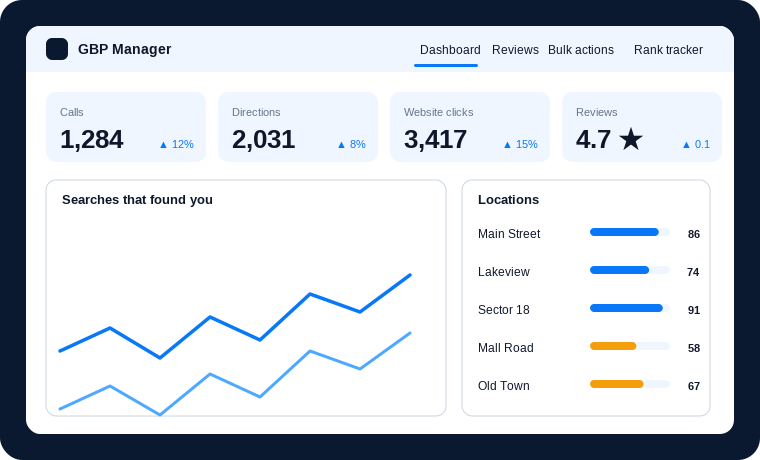
GBP Manager is a web app that, once you sign in with Google and give permission, brings every Google Business Profile location you own or manage into one dashboard: performance numbers, a listing completeness score and a single inbox for customer reviews. You can also post, add photos and update details for many locations at once, watch for removed reviews, and track your Google Maps ranking from a grid of points around each business.
- One dashboard for every location
- A 0–100 listing score with a fix list
- Reply to reviews from one inbox
- Bulk posts, photos and profile edits
- Removed-review alerts
- Google Maps rank tracker
- Your data stays private
Sign up with Google See the features
Start free, no card needed. Read our Privacy policy and Terms of service.
When you continue, Google will ask you to let GBP Manager view and manage your Business Profile locations, reviews and performance data. We use it to show your dashboard, listing score and reviews, and to post replies, posts, photos or profile changes only after you review and confirm them. We do not sell it or use it for ads or AI training. See our Privacy policy. You can remove access at any time in Settings or in your Google Account.
How it works
- Sign in with GoogleUse the Google account that owns or manages the Business Profiles.
- Allow accessGoogle asks you to let GBP Manager manage your Business Profile. You can remove this at any time.
- See your locationsWithin minutes your locations, reviews and performance numbers appear, then refresh automatically.
- Organise and actGroup locations by client, fix what the score flags, answer reviews, and send posts or photos to many locations after a review step.
What you get
Finally, an easy way to keep every listing in shape
Analyze
See how every location is performing
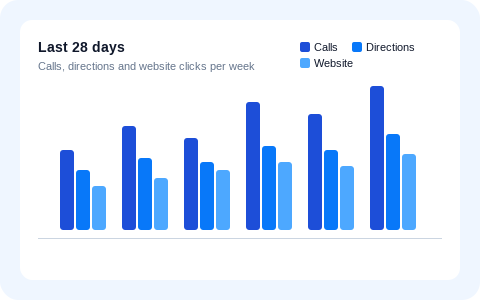
Impressions, calls, direction requests and website clicks for each location over the last 7, 28 or 90 days, side by side and grouped by client.
Fix
Know exactly what each listing is missing
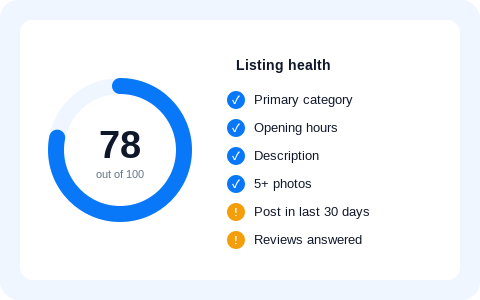
A 0–100 checklist per location covering category, description, opening hours, phone, website, photos, recent posts and unanswered reviews, so you start with the biggest gaps.
Respond
Answer reviews from one inbox
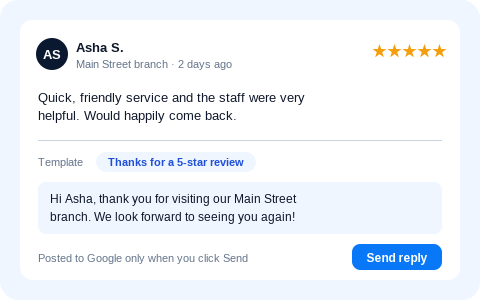
Read reviews from every location, filter by client, location and star rating, and reply with saved templates. A reply goes to Google only when you click Send.
Publish
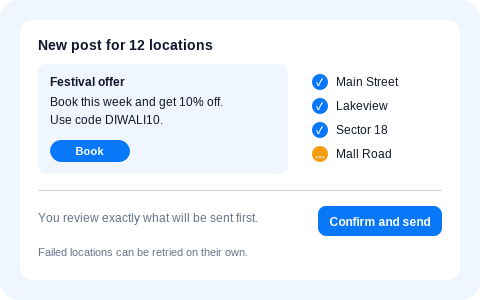
Post, add photos and edit details for many locations at once
Write one post, upload photos or videos, add services, or change hours, phone, website and description for as many locations as you choose. You see exactly what will change, and nothing is sent until you confirm.
Monitor
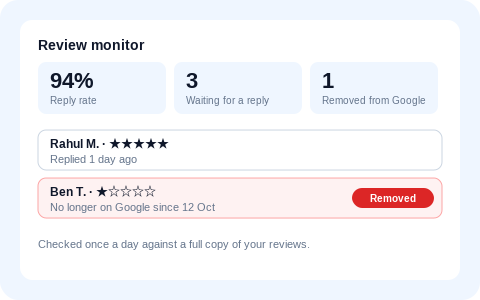
Know when a review disappears
Once a day each location’s reviews are compared with the copy we hold. If a review is gone, you get an alert and a “Removed from Google” list, along with reply rate and waiting time for every location.
Rank
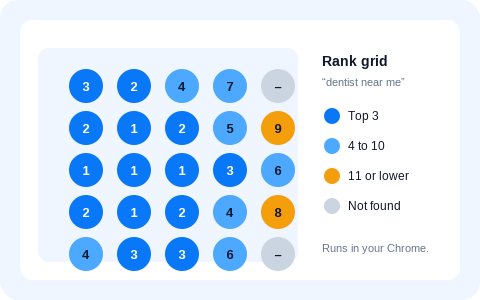
See where you rank on Google Maps
Search Google Maps from every point of a grid around a business and see a colour-coded map of where it ranks, who is winning nearby, and how it changes over time. A free Chrome extension is also available.
Organise and report
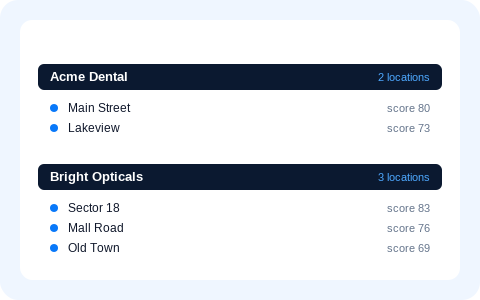
Keep clients tidy and reports easy
Group locations under client names, compare this period with the last, follow the competitors beating you on the map, then export a CSV report or, on the Agency plan, a PDF with your own logo and colours. You can also schedule posts to go out later.
Built for people who manage more than one listing
Agencies
Marketing and SEO agencies that look after Business Profiles for many clients and need one view of all of them.
Consultants
Independent local SEO consultants who report on performance and answer reviews on a client’s behalf.
Multi-location businesses
Owners and in-house teams with several branches who want to see which listings need attention.
Managing listings shouldn’t take a dozen tabs
Before
- Switching between accounts to check each location
- Copying numbers into a spreadsheet for every report
- Reviews waiting because nobody noticed them
- No clear view of which listings are incomplete
With GBP Manager
- Every location in one dashboard, grouped by client
- CSV report in one click
- One inbox for reviews, with reply templates
- One post or photo set sent to every branch
- A score and fix list for every listing
Start free. Upgrade when you need more.
The free plan needs no card: 3 tracked locations, the reviews inbox, replies, templates and a monthly allowance of Google Maps rank-tracker credits. Paid plans start at $19 a month and add more locations, credits, scheduled scans and posts, comparison reports, competitor tracking, and PDF and white-label reports on Agency. Nothing renews or charges your card on its own, so you only ever pay when you choose to. See the plans.
What Google data we access and why
| Permission | What it allows | Why the app needs it |
|---|---|---|
| Sign in (openid, email, profile) | Your name and email address | To create your account and sign you in. |
| Manage your Business Profile (business.manage) | Read your locations, reviews and performance data; post review replies; update listing details; publish posts; upload photos | To show your dashboard, score, review inbox and removed-review monitor, and to carry out the actions you choose: a reply, a post, photos, services or profile details. Each one is shown to you first and only sent after you confirm. The app never deletes reviews or listings, and never changes anything on its own. |
Your data is shown only to you. We do not sell it, use it for advertising, or use it to train AI models. GBP Manager’s use and transfer of information received from Google APIs to any other app will adhere to the Google API Services User Data Policy, including the Limited Use requirements. Full details are in the Privacy policy.
Frequently asked questions
Do you have access to my data?
Only the Google Business Profile data your own Google account can see, and only after you give permission. GBP Manager stores your locations, reviews and performance numbers so it can show your dashboards. Your Google access tokens are stored encrypted. We never sell your data, show ads, or use it to train AI models, and other customers cannot see it.
What permissions does it ask for?
Your name and email address to sign you in, and one Google Business Profile permission (“Manage your Business Profile”). It is used to read your locations, reviews and performance data, and, only for actions you start and confirm, to post replies, publish posts, upload photos and update listing details. GBP Manager never deletes reviews or listings and never changes anything on its own.
Does it reply to reviews automatically?
No. A reply is posted to Google only when you press Send on that review. Templates just fill in the text for you to check first. Bulk posts, photos and profile edits also show you exactly what will be sent and wait for you to confirm.
Can I post or edit many locations at once?
Yes. Under Bulk actions you can publish a post, add photos or videos, add services, or change the description, website, phone, opening hours, special hours and open status for the locations you pick. You review the change first, then each location is processed one by one and you can retry any that fail.
Can I schedule posts for later?
Yes, on every paid plan. In Bulk actions choose a date and time (from 5 minutes to 90 days ahead) instead of sending straight away. You review the post first, exactly as for an immediate one. Until the time comes you can change it or cancel any location from the Scheduled list. Your photos are kept until the post is sent.
See every listing in one place
Connect your Google Business Profile in a minute. Start free, no card needed.
Sign up with Google Ask a question
When you continue, Google will ask you to let GBP Manager view and manage your Business Profile locations, reviews and performance data. We use it to show your dashboard, listing score and reviews, and to post replies, posts, photos or profile changes only after you review and confirm them. We do not sell it or use it for ads or AI training. See our Privacy policy. You can remove access at any time in Settings or in your Google Account.