
Features
Everything you need to keep client listings healthy
GBP Manager reads your Google Business Profile data (with your permission) and turns it into things you can act on: a dashboard, a score, an inbox, a review monitor, period-against-period reports and a Google Maps rank tracker. With your confirmation it can also post (now or at a time you choose), upload photos and update listing details for many locations at once.
Analyze
Performance dashboard
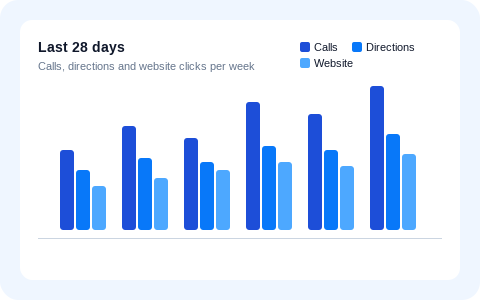
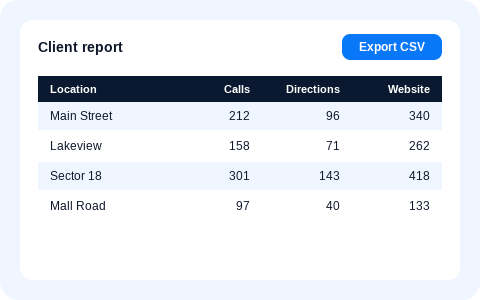
See impressions, calls, direction requests and website clicks for each location, for the last 7, 28 or 90 days.
- All locations side by side, or one client at a time
- Average rating and unanswered reviews for each location
- Refreshes automatically, or press Sync now
Fix
Listing hygiene score
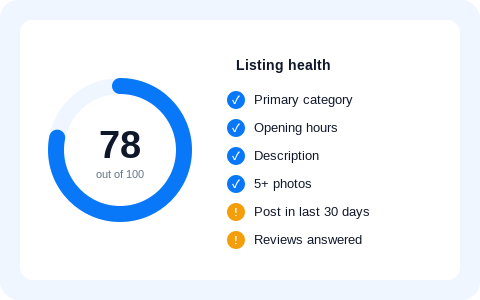
Every location gets a score from 0 to 100 and a plain list of what is missing, so you know where to start. Points are awarded like this:
| Check | Points |
|---|---|
| Business category set | 10 |
| Additional category added | 5 |
| Description of 100+ characters | 10 |
| Website added | 10 |
| Phone number added | 5 |
| Opening hours set | 15 |
| 5 or more photos | 10 |
| A post in the last 30 days | 10 |
| Reviews answered (none waiting = full points) | 15 |
| Listing in good standing with Google | 10 |
Respond
Reviews inbox and reply templates
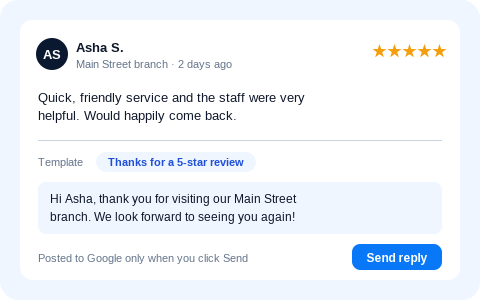
Read reviews from every location in one place and reply without opening each listing.
- Filter by client, location and star rating
- Saved templates for 1 to 5 star reviews, with the reviewer’s name and location filled in
- Nothing is posted until you click Send
Monitor
Deleted review monitoring and reply status
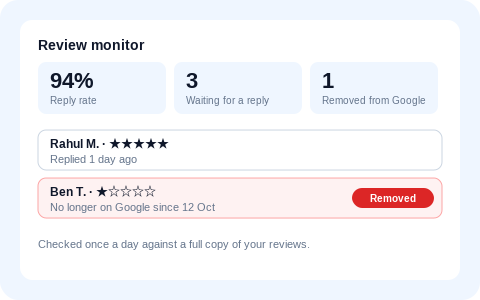
Once a day each location’s full review list is compared with what we hold. A review that is no longer on Google is marked “Removed from Google”, shown in its own list, and raises an alert.
- Reply rate, unanswered count and oldest waiting review for every location
- Removed reviews are kept with the name, stars and text we saw earlier
- Google does not say why a review disappears, so the app only reports that it is gone
- A removed review is never counted in your averages and cannot be replied to
Publish
Bulk posts, services, photos and profile edits
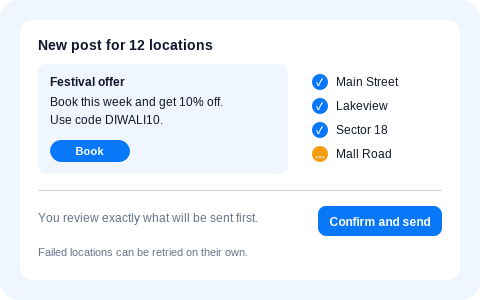
Choose the locations, fill in one form, and review what will be sent. When you confirm, each location is processed one by one and you can watch the progress and retry any that failed.
- Posts: updates, offers and events, with a button and photo
- Scheduled posts: pick a date and time (up to 90 days ahead) and the post goes out on its own. Change the time or cancel any location until then. Starter plan and above
- Photos and videos: upload JPG or PNG files or paste links, choose the category (exterior, interior, product and more)
- Services: add service names, descriptions and prices without removing the ones already there
- Profile details: description, website, phone, opening hours, special hours and open status
- Every change is written to a log with the old and new value
Rank
Google Maps rank tracker
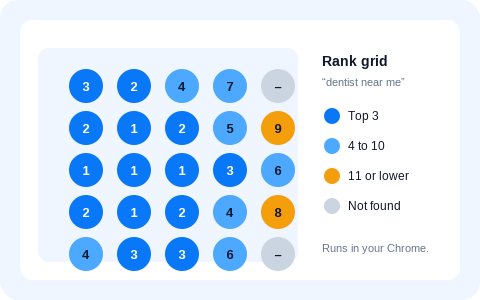
Pick a business and the phrase customers search. The tracker searches Google Maps from every point of a grid around the business and shows a colour-coded map of where it ranks and where it drops out, who is winning around it, and how that changes from scan to scan.
- 3×3 up to 13×13 grids, and the distance you choose
- Scheduled weekly or monthly scans, trend chart and CSV download
- A private share link for clients
- Follow competitors: add the businesses beating you and see their top-3 coverage next to yours on every scan, with a chart over time (Professional: 5 per business, Agency: 15)
- A free monthly pin allowance for every account, plus a free Chrome extension that runs in your own browser
Organise
Clients and locations
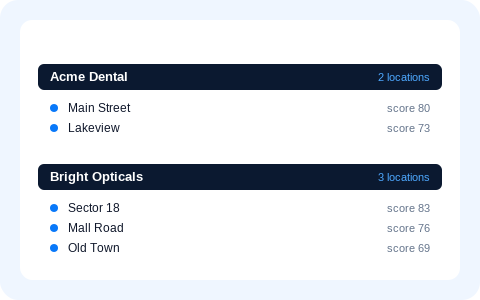
Group locations under client names, choose which locations to track, and see each location’s score and what is missing.
- Works for one business or fifty clients
- Switch locations on or off to stay within your free limit
- Every customer’s data is kept separate
Compare
Performance comparison reports
Put this period next to the one before it. Every location shows whether impressions, calls, direction requests and website clicks went up or down, and by how much, and so does the total.
- Last 7, 28 or 90 days against the same number of days before
- Your latest map-ranking scan against the scan before it, for every business you track
- A location without enough earlier history shows a dash instead of a misleading percentage
- The comparison is included in the CSV and PDF downloads
- Professional plan and above
Report
CSV and PDF reports, with your own branding
Export performance numbers for all locations, or for one client, as a CSV file you can open in Excel or Google Sheets and send on. Agency accounts can also download finished PDF reports.
- PDF performance report for all locations or one client, with the comparison if you switch it on
- PDF map-ranking report with the heat map, who is winning around you and the competitors you follow
- White label: add your own company name, colour, logo and footer line. They appear on the PDFs and on client share links, with no GBP Manager branding
- PDF and white label: Agency plan
Which plan has which feature
| Feature | Free | Starter | Professional | Agency |
|---|---|---|---|---|
| Scheduled posts | — | Yes | Yes | Yes |
| Performance comparison reports | — | — | Yes | Yes |
| Competitors followed per business | — | — | 5 | 15 |
| Private client share links | — | Yes | Yes | Yes |
| PDF reports | — | — | — | Yes |
| White-label reports and links | — | — | — | Yes |
What GBP Manager does not do
- It never replies, posts, uploads or edits anything without you reviewing it and confirming. A scheduled post goes out only at the time you chose, and you can change or cancel it until then.
- It never deletes reviews or listings.
- It has no AI features and does not use your data to train AI models.
- The rank tracker does not use your Google Business Profile data. It sends only the search phrase and map coordinates you choose to a ranking-data provider. The optional Chrome extension sends nothing to us.
See every listing in one place
Connect your Google Business Profile in a minute. Start free, no card needed.
Sign up with Google Ask a question
When you continue, Google will ask you to let GBP Manager view and manage your Business Profile locations, reviews and performance data. We use it to show your dashboard, listing score and reviews, and to post replies, posts, photos or profile changes only after you review and confirm them. We do not sell it or use it for ads or AI training. See our Privacy policy. You can remove access at any time in Settings or in your Google Account.