
Quick answer: A local citation is any mention of your business name, address and phone number on another website. Start with the platforms customers and Google actually use (Google, Bing, Apple, Facebook), then add the main directories and industry-specific sites in your field, then local sources like your chamber of commerce. Keep every listing identical to your master record, track them in a sheet, and avoid mass submission to low-quality directories.
Citations are one of those local SEO tasks that sounds technical but is mostly careful admin. They are mentions of your business that help people find you, and help search systems confirm that your business exists and where it is. Google lists "prominence", meaning how well known you are, as one of its three local ranking factors, and citations are part of that web of mentions.
Structured and unstructured citations
- Structured citations are listings with fields for name, address and phone, such as Bing Places, Apple Business Connect, Facebook, Yelp and industry directories.
- Unstructured citations are mentions inside other content: a local news article, a blog post, a sponsor page or an event listing.
You build structured citations by creating or claiming listings. You earn unstructured ones through being active in your community and getting mentioned.
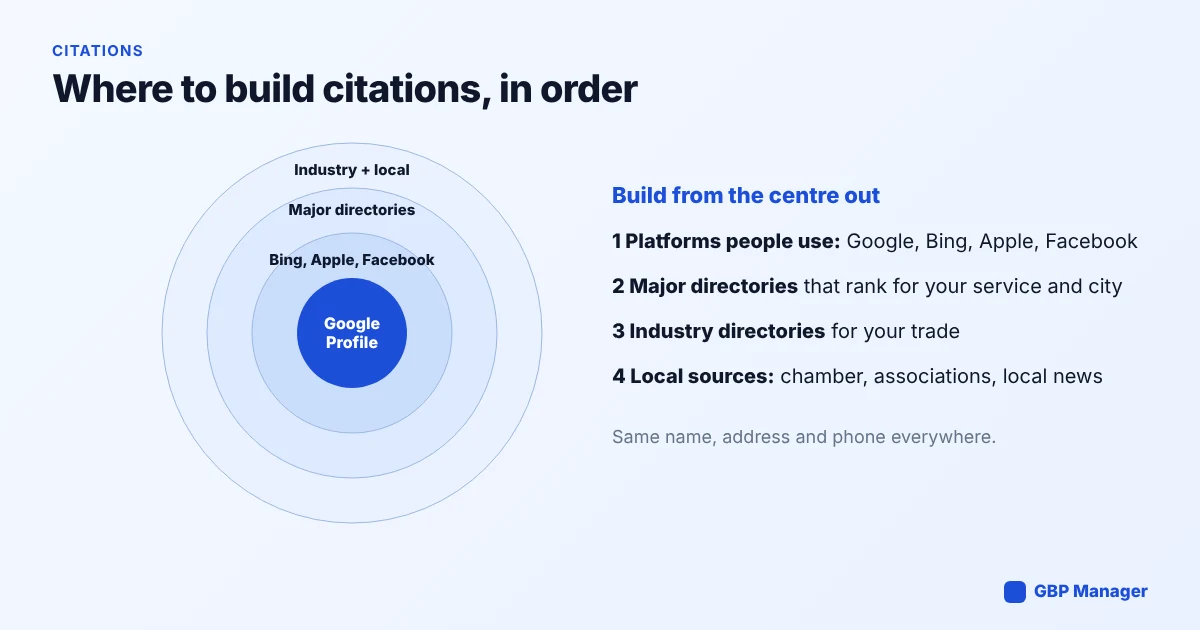
Where to start, in order
Work from the centre outwards.
Tier 1: The platforms people actually use
- Google Business Profile. The most important listing you have.
- Bing Places. Controls how your business shows in Bing search and maps.
- Apple Business Connect. Feeds Apple Maps.
- Facebook and Instagram business pages. People look for you here.
Tier 2: Major general directories
Well-known directories in your country, such as Yelp in the US or Yell in the UK. Pick the ones that appear when you search for your service and city. If a directory ranks on page one for your service in your area, it is worth having a clean listing there.
Tier 3: Industry-specific directories
Directories in your trade: legal, medical, trades and home services, restaurants, wedding vendors, real estate and so on. These are often more valuable than general ones because they send people who are ready to buy.
Tier 4: Local sources
- Your chamber of commerce
- Local business associations
- Local news and community sites
- Sponsorship and event pages
- Supplier and partner pages
These show you are part of the community, and they often link to your website too.
Step by step: build and tidy your citations
- Write your master record. One version of your name, address, phone, website and hours. See NAP consistency.
- Search before you create. Search your business name and phone number on each directory. Claim an existing listing instead of making a duplicate.
- Copy and paste from the master record. Do not retype.
- Choose the right category on each listing. Use the same wording where possible.
- Add photos, hours and a description where the platform allows it. A complete listing looks more trustworthy.
- Add your website URL exactly as it is on your master record.
- Verify the listing if the platform asks for it.
- Log it in your tracking sheet.
Your tracking sheet
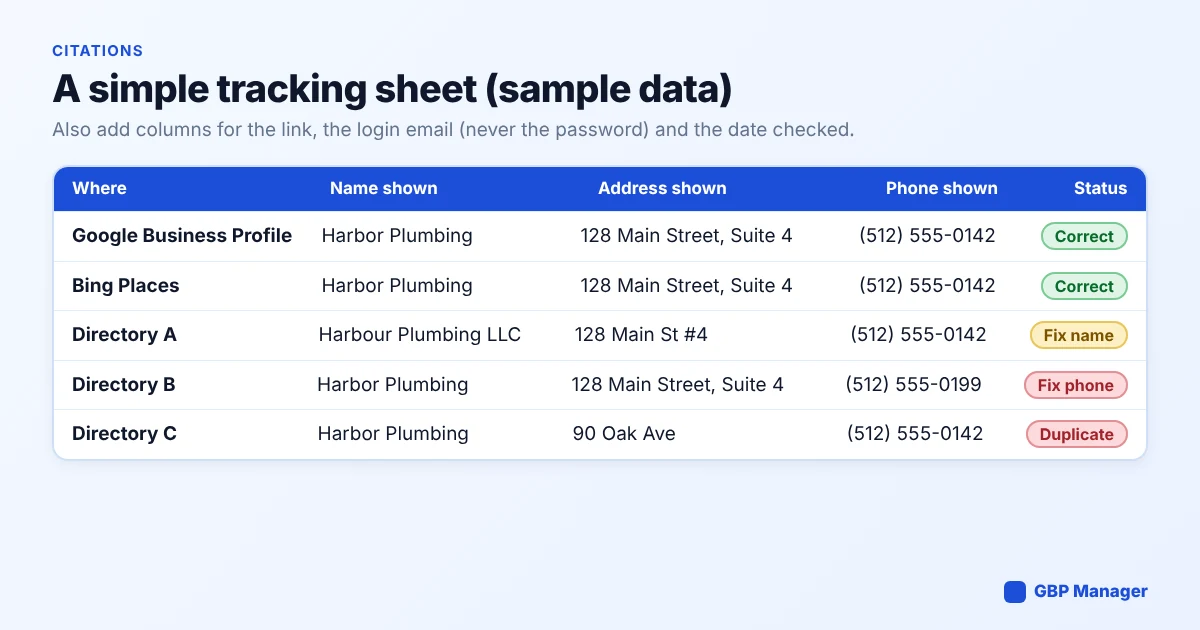
Use a spreadsheet with one row per listing and these columns:
- Where (platform name)
- Link to your listing
- Login (email only, not the password; store passwords in a password manager)
- Date created or checked
- Name, address, phone as shown
- Status (correct, needs fixing, duplicate, pending)
Check the whole sheet each quarter. Add a column for who is responsible.
How many citations do you need?
There is no magic number. Quality and accuracy matter more than quantity. As a rule of thumb (not a Google figure), 20 to 40 clean listings is a sensible target for most small businesses, made up of the main platforms, the best-known directories, the top industry directories for your trade and a handful of local sources. If you are in a competitive market, check the listings your top competitors have, and make sure you have the ones that matter.
What to avoid
- Mass submission to hundreds of directories. Many are low quality, hard to update, and a source of duplicates.
- Paying for listings you do not need. Many directories are free to list.
- Using a different phone number in each directory. Use one main number.
- Adding keywords to your name. It breaks Google's guidelines and can lead to suspension.
- Leaving old listings after a move or a rebrand. They keep sending customers to the wrong place.
- Creating a second profile for the same business or location. Google's guidelines say to keep one profile per business, and multiple profiles can lead to suspension.
Fixing a duplicate listing
- Find all copies. Search your phone number, old phone number and address.
- Choose which listing to keep, usually the oldest or the one with the most history.
- Claim the duplicate and use the platform's merge or removal option. Many platforms have a "report a duplicate" form.
- Make sure the remaining listing has your master details.
- Check again in a few weeks, since directories take time to update.
What most guides miss
- A citation you can find is worth more than one you cannot. Before you build, search "[your service] [your city]" and note which directories appear. Prioritise those.
- Check the competitors' lists, not a generic list. The best citations for you are the ones your top three competitors have and you do not.
- Your website is a citation too, and the first one people check. Make sure it matches your master record, including your schema markup.
- Local links beat directory links. A mention on your chamber's website or a local news site is harder to get than a directory listing, and often worth more. Spend a few hours on these each quarter.
- Keep passwords out of the sheet. Use a password manager, and use a shared business email for logins, not a personal inbox that leaves when someone does.
- A citation is not a review. Directories can show reviews too. Reply to those where you can, and send review links for Google first, because that is where most customers look. See How to get more Google reviews.
Quick answers
Do citations still matter? Google says prominence is one of three local ranking factors, and consistent mentions of your business are part of how a business becomes known and trusted. Treat citations as groundwork rather than a trick.
Are paid citation services worth it? Sometimes, for a large number of locations. For one location, you can do the important ones yourself in a few hours.
How long do citations take to show up? Anywhere from a day to a few weeks depending on the directory.
What if a directory will not let me edit my listing? Claim it first. If you cannot, contact the directory's support with your proof of ownership.
Check the result on the map
After you have cleaned up your listings, run a free local rank map and repeat it in a month. Improvements from citation work are usually slow and steady, so compare maps over several weeks.
GBP Manager is not affiliated with Google. Google, Apple, Bing and Facebook are trademarks of their owners.