
Quick answer: To get more Google reviews, ask every customer, right after a good moment, with a direct review link, and do it every day instead of in bursts. Set a monthly target, track how many asks turn into reviews, and reply to every review. Do not offer rewards, do not ask only happy customers, and do not tell people what to write.
Most local businesses have far more happy customers than reviews. The gap is not satisfaction. It is that nobody asked, or asking was too much work. The fix is a small system that runs every week, and the rest of this guide shows how to build one.
Step 1: Know your baseline and set a target
You cannot plan without a number. Write down:
- your review count and average rating
- how many reviews you got in the last 30 days
- the review count of the competitor who beats you on your map
Open Free local rank checker and run a map. The Who is winning around you table shows the leaders with their ratings.
Now do the math. If the leader has 180 reviews and you have 60, the gap is 120. Pick a monthly target, then divide:
- At 10 new reviews a month, the gap takes 12 months.
- At 20 a month, 6 months.
- At 30 a month, 4 months.
Use the monthly target you can really hit. A modest number every month beats a big push and then silence. (The leader keeps getting reviews too, so aim a little higher than the arithmetic.)
Step 2: Work out how many asks you need
Not every customer who gets your link writes a review. Your conversion rate is reviews received divided by links sent. It varies a lot from business to business, so measure your own:
- Count the links you send in a week.
- Count the new reviews that arrive in the same week.
- Divide the second by the first.
If you send 40 links a week and get 4 reviews, your rate is 10%. To get 20 reviews a month (about 5 a week), you need to send about 50 links a week. If that is more than your customers, you need to ask more of the people you serve, improve the message, or improve the moment you ask.
Step 3: Pick your moments
Ask when the customer has just had a good result and has a minute. Think about what that moment is in your business.
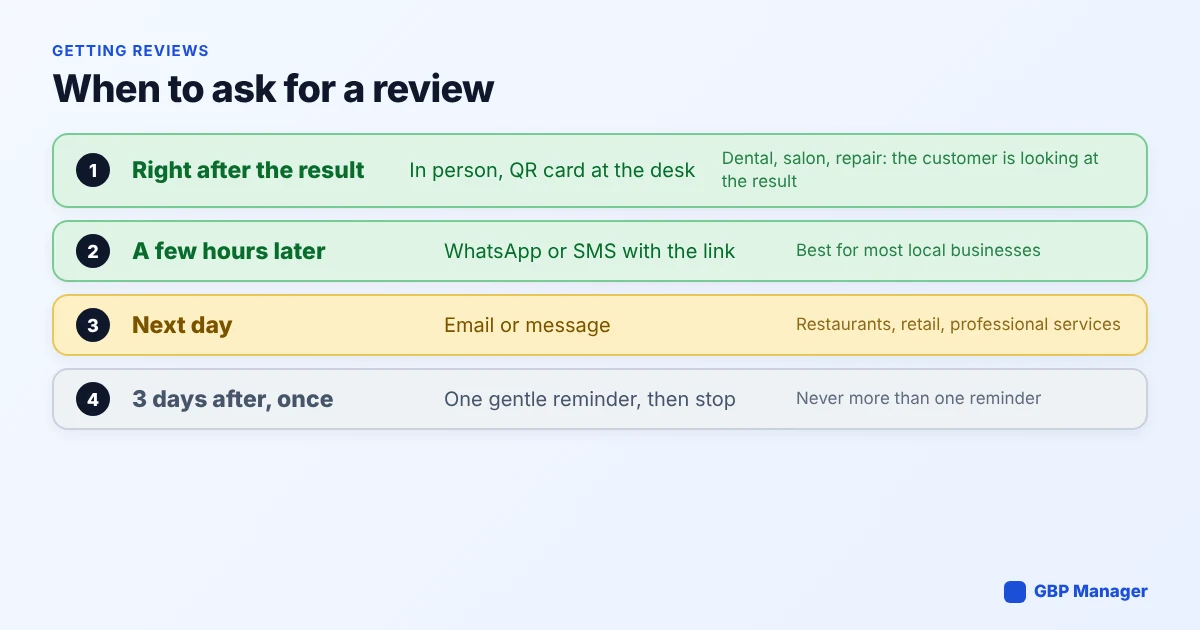
A few examples:
- Appointment-based (dental, medical, salon): at checkout, and a message a few hours later.
- Home services: when the job is finished and the customer has seen the result.
- Restaurants and cafes: with the bill, or the next morning.
- Retail: after a purchase, in the bag or by receipt message.
- Professional services: after the work is delivered and the client says thanks.
Rule of thumb: the closer to the happy moment, the easier it is.
Step 4: Make it effortless with a link
Give people a direct link or QR code that opens the review box. Google says customers need a Google Account to leave a review. They can create one with a non-Gmail email address, so keep your request short.
How to get your link, make a short address, create a QR code and test it is in Google review link and QR code.
Step 5: Pick your channel
Use the channel your customers already use.
- WhatsApp or SMS: short and personal. Best for most local businesses.
- Email: works well if you already send booking or receipt emails. Add the link to the confirmation.
- In person: one sentence from the person who served them, with a QR card as backup.
- Printed cards and receipts: a passive way to catch people on the way out.
A good message is two or three short sentences, starts with thanks, mentions the person, and has one link.
Hi Ananya, thank you for visiting Sunrise Dental today. If you were happy with your visit, would you mind sharing a quick review? It takes one minute: yoursite.com/review. Thank you! – Priya
Step 6: Make it somebody's job
A system with no owner stops in a week. Assign it:
- One person owns the process. Their job is to send the links, count them and report weekly.
- Everyone who serves customers asks. One sentence, every time, no pressure.
- Put the count on a board. A weekly tally in the staff room, "links sent" and "reviews received", is surprisingly motivating.
- Send links at a fixed time. For example, every evening at 6 pm, send a link to everyone served that day.
Step 7: Reply to every review
A reply says thank you, and it encourages the next customer. It also shows new readers you care. Google lists replying to reviews among its tips for improving local ranking. Reply within a day or two, and use templates to save time. See How to respond to Google reviews: 20 examples.
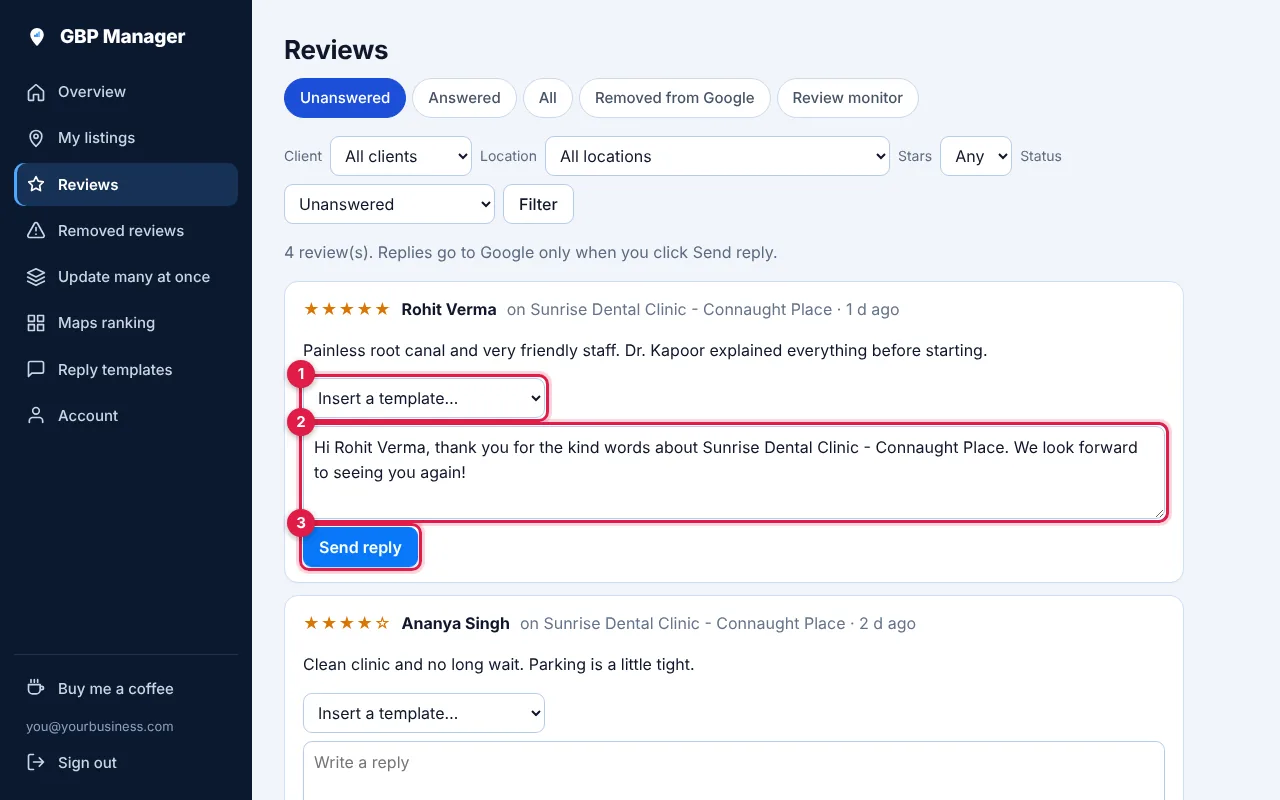
In GBP Manager, open Reviews. Reviews that need a reply are shown first, and templates fill in the name for you.
Step 8: Watch the numbers each week
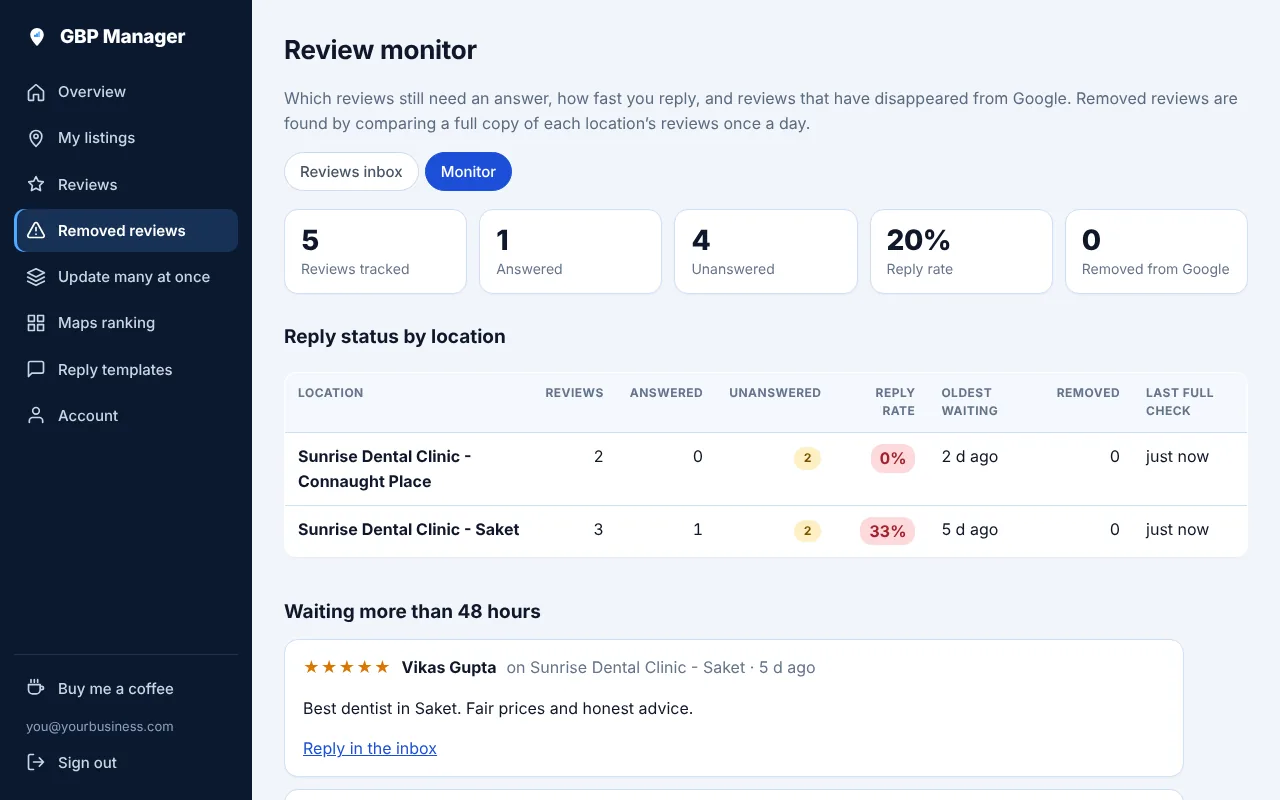
Check your weekly count, your rating, your reply rate and the oldest review waiting for a reply. In GBP Manager, the Removed reviews page doubles as a review monitor and shows your reply rate for each location, how long the oldest unanswered review has been waiting, and any review that has disappeared from Google.
Rules you must follow
Google's policy lets businesses ask for genuine reviews, as long as they offer no incentive and do not try to influence the rating or wording. In practice:
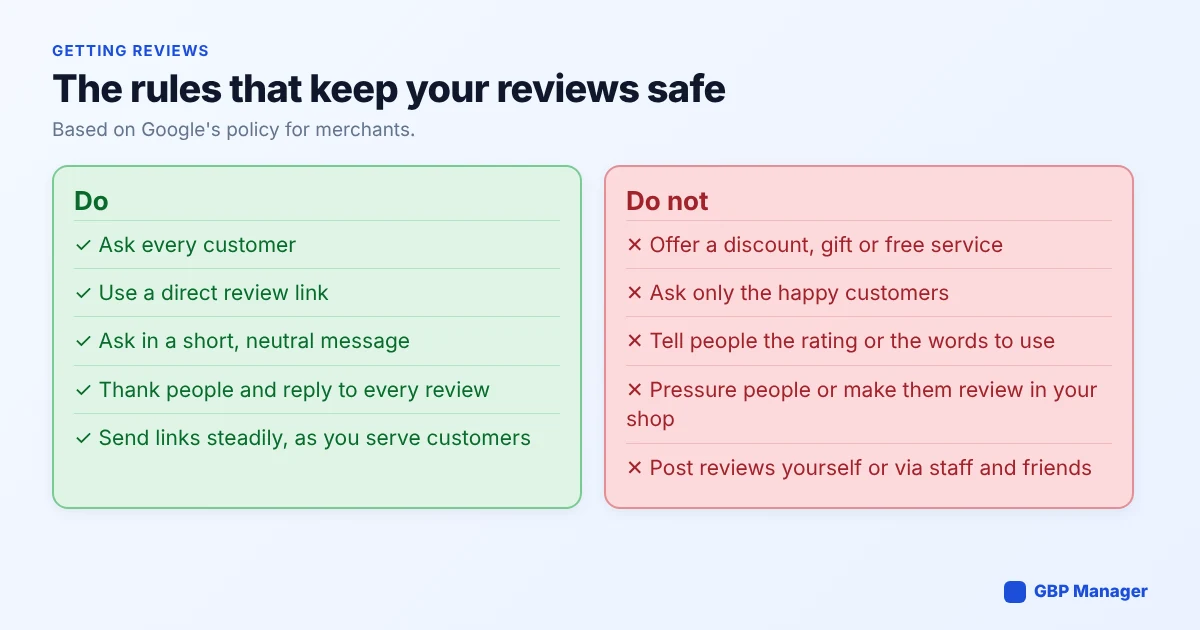
- Do ask every customer, use a neutral message and thank people.
- Do not offer discounts, gifts or free services in exchange for a review, or for changing or removing one.
- Do not ask only customers you think are happy. Google says businesses may not selectively ask for positive reviews.
- Do not tell people what rating to give or what to say. Ask an open question like "how was your visit?" instead of "please say we were great".
- Do not pressure people or make them write a review in your shop.
- Do not go for a big burst. Google bans unusual volumes or patterns of reviews meant to shift a rating, so ask at the pace your business actually serves customers.
- Do not post reviews yourself, or have staff, family or friends post them. Google does not allow reviews from people with a conflict of interest.
What most guides miss
- A complaint channel is allowed, a filter is not. You may add a line such as "If something went wrong, please call us on 011-555-0100 so we can fix it" to your message. You must still send the same review link to everyone. Sending the link only to customers who replied "great" is the selective asking Google forbids.
- Fix the cause, not the count. If three reviews in a row mention the wait, no ask script will fix it. Read your 1 to 3 star reviews monthly and write down the top two reasons. Fixing those is the cheapest way to raise your rating.
- Reviews you earn in quiet months matter. A steady flow also shows new customers that the business is active. Send links in slow weeks as well.
- Train staff to ask in a sentence, not a pitch. "If you were happy today, a short review would really help us. There is a QR code here" is enough.
- Do not forget the customers who do not use WhatsApp or Google. Offer a printed card and an email option for everyone else.
Quick answers
How many reviews do I need? Enough to match the businesses you compete with on your map. Check the leaders on your Who is winning table and set a target from that.
Is it okay to ask customers for reviews? Yes. Google's policy allows asking for genuine reviews, as long as there is no incentive and you do not try to influence the rating or the words.
Can I give a discount for a review? No. That is strictly prohibited by Google.
How often should I send the link? To every customer, once, with at most one gentle reminder.
What if I get a bad review? Reply calmly, learn from it and keep going. See How to respond to Google reviews.
Try it
GBP Manager is free. Use Reviews to answer every review, Removed reviews to track your reply rate, and Maps ranking to see how your reviews move your map.
GBP Manager is not affiliated with Google. Google and Google Business Profile are trademarks of Google LLC.