
Quick answer: Local keyword research means finding the phrases people type when they want what you sell nearby. List your services in your customers' words, expand them with Google's own suggestions, group them by what the person wants, then pick three to focus on: one main service, one second service and one problem-based phrase. Use them on your website and profile, and track each one on a ranking map.
Local keyword research is simpler than the general kind. You are not fighting for the whole internet, only for the people near you who are ready to act. The aim is not a long spreadsheet. It is a short list of phrases you will actually use.
Step 1: List your services in your customers' words
Write down everything you sell. Then ask how a customer would say it. They often use different words from you.
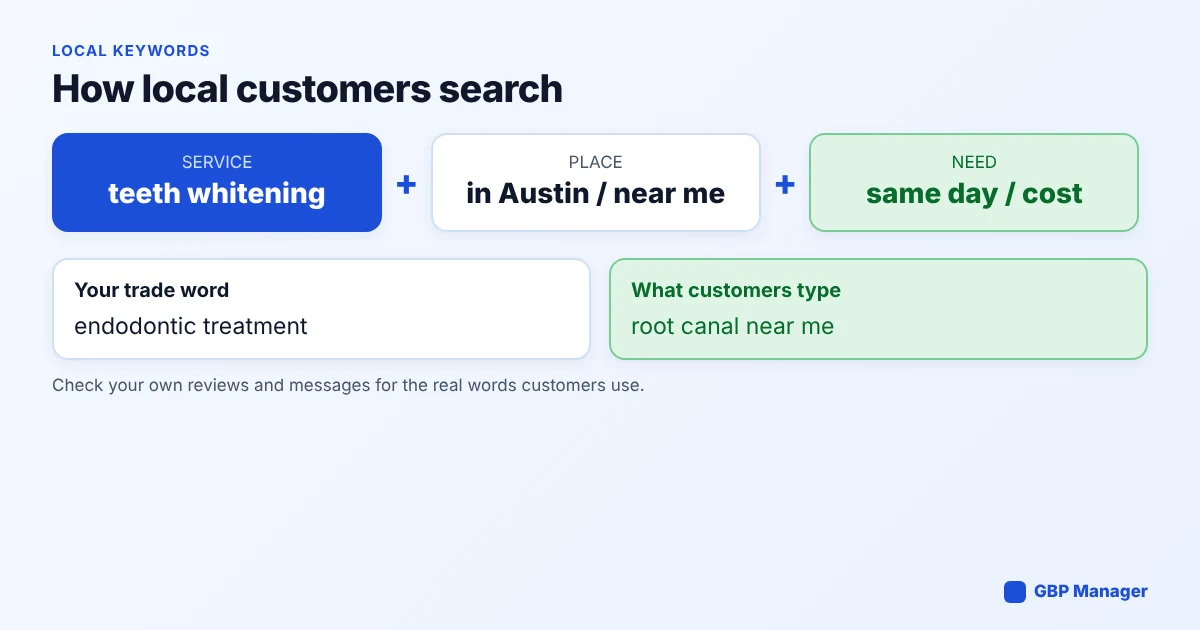
For example, a dentist might list "endodontic treatment". A patient types "root canal". A plumber writes "drainage services". A customer searches "blocked drain". The customer's word is the keyword.
Where to find customer language:
- Your own reviews: what do people say they came for?
- Emails, calls and WhatsApp messages: what do people ask?
- The way staff describe the job to a new customer.
- Competitors' reviews, which show what customers care about.
Step 2: Expand with Google's own suggestions
Google shows you what people search for, for free.
- Autocomplete. Type a service in Google and Google Maps ("emergency plumber") and note the suggestions that appear below the box.
- People also ask. Open a search and expand the related questions. These show what people want to know before they buy.
- Related searches at the bottom of the results page.
- Google Keyword Planner, free with a Google Ads account, shows search volume ranges.
- Search Console, if your website is verified, lists the queries that already bring people to your site.
Write each phrase on a list. Do not judge yet.
Step 3: Understand the intent behind each phrase
Group the list by what the searcher wants. Intent decides which page or profile section should answer it.
- Ready to buy now: "emergency dentist near me", "24 hour plumber". These are urgent and high-value. Your profile and a service page should answer them.
- Comparing options: "best dentist near me", "dentist with good reviews". Reviews, rating and photos decide these.
- Looking for a specific service: "teeth whitening", "invisalign". Give each its own page.
- Looking for information: "how much does a root canal cost". A helpful blog post or FAQ can capture these early, though they are less likely to book immediately.
- Looking for the business itself: brand searches. Make sure your profile and website show up.
Step 4: Add the "near me" and place modifiers carefully
People use "near me", a city, a neighbourhood or a landmark. Some details:
- "Near me" works from the searcher's location. You cannot rank for it on your website the way you would for a city name, but your profile, reviews and proximity matter a lot.
- City and neighbourhood phrases (for example "plumber in Austin") are best for your website pages, titles and headings.
- Do not add your city to the phrase when you check a ranking map. Each point on the map acts as its own location. See Free local rank checker.
Step 5: Pick three phrases, not thirty
You cannot work on everything. Pick three:
- Your main service, the one that brings the most money (for example "dentist").
- A second service you want to grow (for example "teeth whitening").
- A problem phrase that signals urgency (for example "emergency dentist").
Check how many people search for each, and how many results are close by. A phrase with lots of searches and many strong competitors is slow to win. A phrase with fewer searches and weaker competitors can be a quick win. If you can compare, prefer a phrase you can win in three months over one you might win in three years.
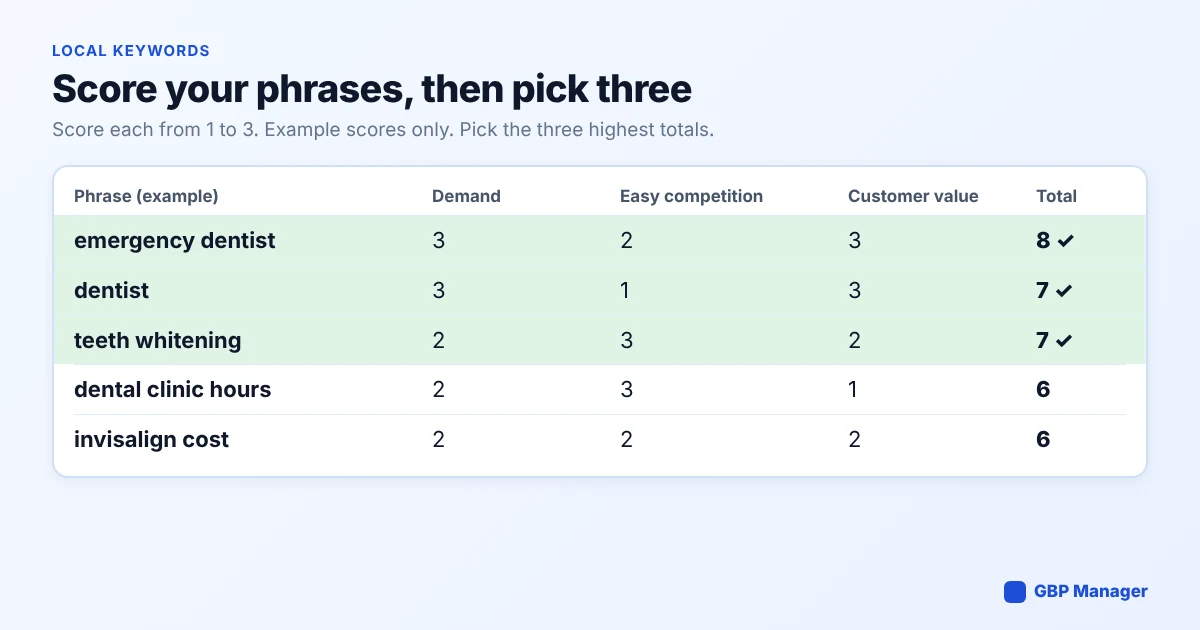
A simple way to score: give each phrase 1 to 3 for how many people search, 1 to 3 for how easy the competition looks (3 = easy), and 1 to 3 for how valuable the customer is. Pick the three highest totals.
Step 6: Use the phrases in the right places
- Google Business Profile: your primary category, services, and a business description that describes what you do in natural language. Do not stuff keywords, and never add them to your business name.
- Website: one page per service and per location, with the service and city in the title tag and main heading, and helpful content below.
- Posts and photos: describe your work in plain words, with the service name in context.
- Reviews: you cannot ask customers to use certain words, but you can serve them well so they mention what you did. Google does not allow businesses to request specific content in reviews.
Step 7: Track them on a map
Add each of your three phrases to a ranking map and check them every month. In GBP Manager, open Maps ranking and type the phrase the way a customer would, without the city.
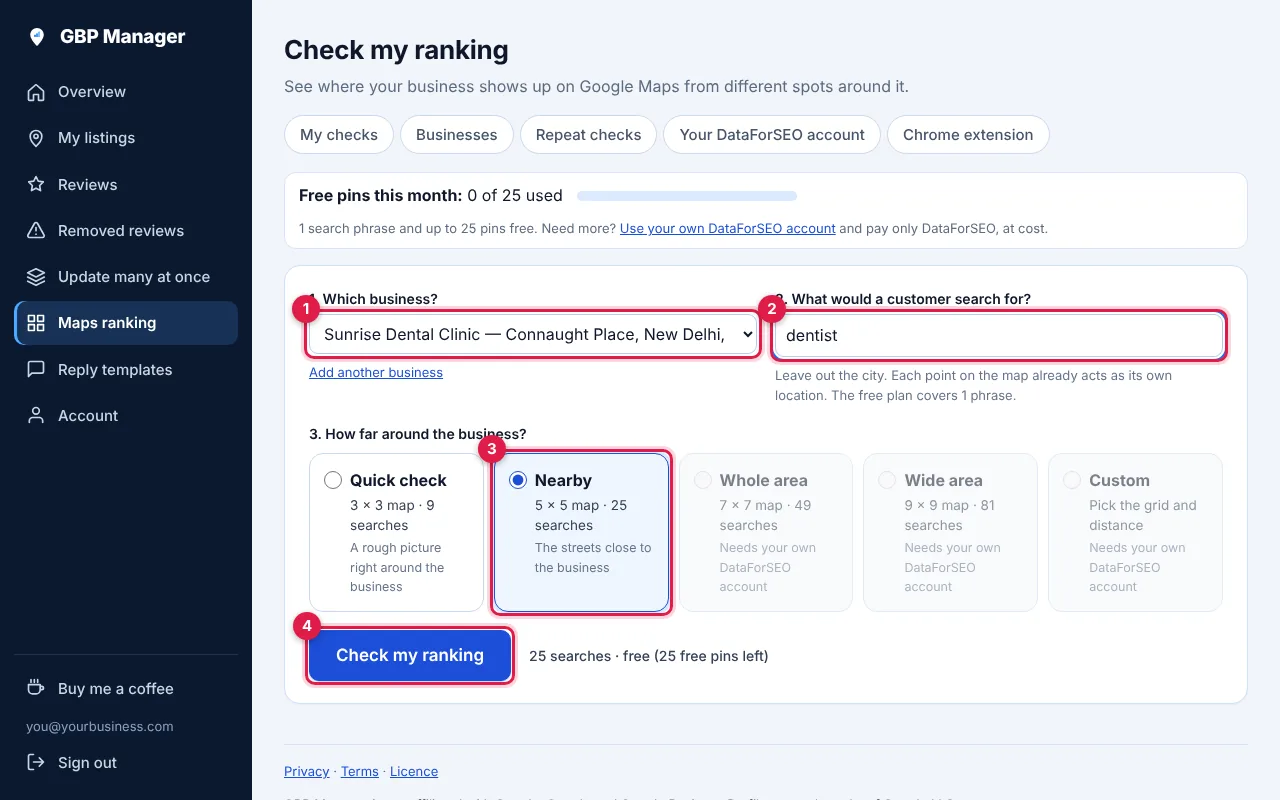
The free plan covers one phrase and up to 25 pins a month, so start with your main service. A bigger plan covers more phrases. The costs are explained in What Google Maps rank tracking costs.
What most guides miss
- Search volume is the wrong first filter for local. Local volumes are small. A phrase with 50 searches a month can be worth more than one with 5,000 if it brings in a ready-to-buy customer. Think value per search, not volume.
- Customers use a different word from your trade. Check your reviews for the real words. "Gum treatment" versus "periodontal therapy", "geyser repair" versus "water heater repair" (a US versus India example). Use the words your own market uses.
- Misspellings can have real volume. In keyword data we pulled in November 2026 for the US, the misspelled "google busines profile" had about 2,900 searches a month, and dozens of other typo variants add up too. If your business or service name is easy to misspell, mention the common variants naturally on your site.
- Check the map, not just the numbers. A phrase can look easy in a tool but be impossible if three competitors with hundreds of reviews sit next to your door. Your ranking map shows reality.
- Re-do the research each year. Seasons, regulations and new services change what people search for.
- Different phrases show different maps. "Dentist" might rank you well in the north, and "emergency dentist" in the south. That is useful information about where each part of your business is strong.
Keep going
Use your three phrases in the Google Business Profile optimization checklist, track them in your monthly routine from the local SEO checklist, and see how to improve your rankings in How to rank higher on Google Maps.
Quick answers
Do I need a paid keyword tool? No. Google autocomplete, People also ask, Keyword Planner and Search Console are enough to start.
How many keywords should I target? Three for your ranking maps, and a few more phrases per service page.
Should I include "near me" on my website? Use natural phrases with your service and city. "Near me" is decided by the searcher's location, not by your page text.
How often should I update my keywords? Once a year, and whenever you launch a new service.
Try it
Pick your first phrase, then check where you rank for it. GBP Manager's free plan covers one phrase.
GBP Manager is not affiliated with Google. Google, Google Maps and Google Business Profile are trademarks of Google LLC.