
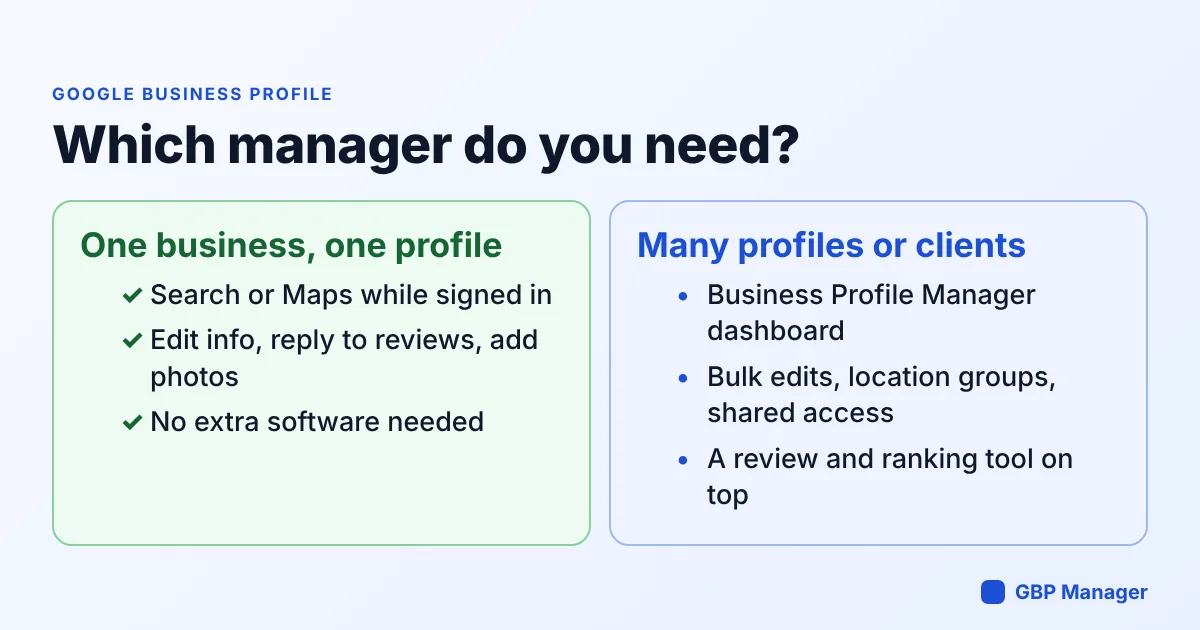
Quick answer: "Google Business Profile Manager" is Google's dashboard for managing profiles, found at business.google.com. If you own one profile you can manage it straight from Google Search or Maps while signed in. If you look after many locations or many clients, you use the Business Profile Manager dashboard, and many agencies add a separate tool for review replies, posts and ranking.
People search for this phrase for three different reasons, so this guide covers all of them: opening the dashboard, knowing what it can and cannot do, and choosing a tool when one profile has turned into twenty.
What Google Business Profile Manager is
Your Business Profile is the listing customers see on Google Search and Maps. The manager is the place where owners and managers edit it. Google has changed the names and the buttons several times (the product used to be called Google My Business), which is why the search results are confusing. In practice you will meet it in two ways:
- On Search and Maps. When you are signed in to the Google Account that manages a profile, searching for your business name shows an edit panel on top of the results. This is enough for most single-location businesses.
- At business.google.com. This is the Business Profile Manager dashboard. It lists every profile your account can manage, lets you search and filter them, and is the home of multi-location tools.
If you are not sure which of your accounts manages a profile, see how to find your own Google Business Profile.
What you can do in the dashboard
Owners and managers can do most day-to-day work from here:
- Edit business details such as hours, phone, website, categories and description.
- Add photos, videos and posts.
- Read and reply to reviews.
- See performance numbers such as calls, direction requests and website clicks.
- Add and remove people who help manage the profile.
Only owners can add or remove users and remove a profile. Managers can do nearly everything else. If you manage a client's profile, ask for manager access rather than ownership. It is safer for both sides, and it keeps ownership with the business. The full role rules are in how to add and manage users.
When the dashboard stops being enough
The dashboard works well for a handful of locations. Problems appear when:
- you manage dozens of profiles and need to find the ones that need attention,
- reviews arrive faster than you can open each profile to answer them,
- clients want proof that things are improving (rankings, reply rates, review counts),
- the same post or offer has to go to many locations.
Google has bulk options for large chains, such as location groups and spreadsheet uploads, but they are built for chains, not for a freelancer with ten clients.
What to look for in a tool that manages many profiles
When you compare tools, check these things in order:
- It signs in with Google, not a password. A tool should use Google's official sign-in (OAuth). Never give a tool the password to a Google Account.
- It reads every profile you can access and keeps them in one list.
- It puts all reviews in one inbox, so you answer them without opening each profile.
- It tracks rankings on a map, because a profile that ranks #1 in one spot may rank #15 two miles away.
- It can post to many profiles at once when the message is the same.
- It lets you separate clients, so one client never sees another client's data.
- Pricing you can predict, with a free tier to test on a real profile.
How GBP Manager fits
GBP Manager is built for exactly this gap. You sign in with Google, choose which profiles to connect, and then work from one place:
- Reviews: one inbox across all connected profiles, with saved reply templates. See how to reply to Google reviews faster.
- Maps ranking: check where a business shows up on a map grid and repeat the check to see change. See how to check your Google Maps ranking.
- Bulk posts: publish one update to many locations. See how to post to many profiles.
- Clients: group profiles by client for reports.
It reads your profiles through Google's official access, and you can disconnect at any time. It is not made by Google.
A simple setup that works
- Make sure you are an owner or manager on every profile. Ask clients to add you from People and access.
- Sign in to the tool with that same Google Account.
- Connect only the profiles you plan to work on.
- Set up reply templates for 5-star, 3-star and 1-star reviews.
- Run a first ranking check for each profile and save the result as your baseline.
- Review it weekly. A 20-minute weekly routine beats a monthly panic. The local SEO checklist shows what to check.
Common mistakes
- Using one personal Gmail for everything. If that person leaves, access leaves with them. Use a shared work account and keep a second owner.
- Being listed as owner on client profiles. Ask for manager unless you really are the business.
- Skipping the verification step on new profiles. Unverified profiles cannot be fully managed. See Google Business Profile verification.
- Posting the same text to every location. Change at least the town or service in each post.
Quick answers
Is Google Business Profile Manager free? Yes. Google does not charge for the profile or the dashboard.
Can I manage a profile without the dashboard? Yes. Searching your business name while signed in gives you the edit panel.
Can an agency manage my profile without owning it? Yes. Add them as a manager.
How many profiles can one account manage? Many. Google does not publish a small fixed cap for ordinary accounts, but very large lists work better with location groups.
Try it
GBP Manager is free to start. Connect one profile, reply to your reviews from one inbox and run a ranking check.